


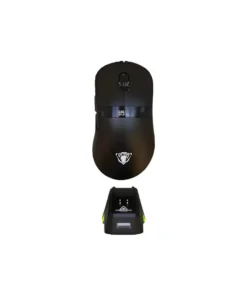
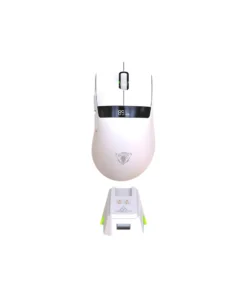
JEDEL GWH-102 Tri-Mode Gaming Mouse
Buy the JEDEL GWH-102 Tri-Mode Gaming Mouse in Bangladesh from T-TECH. A genuine mouse with reliable performance and great value. Price in Bangladesh: 2,500. 100% authentic with warranty and cash on delivery nationwide.
 Call Now for Online Order
 Via Messenger
 Via WhatsApp
Warranty

Shipping


Payment Methods
Delivery Time
Inside Dhaka: Next day to 3 business days. *Inside Dhaka North and South City Corporation. Outside Dhaka: Next day to 5 business days.
Shipping Charge
Inside Dhaka: Starts from 70Tk. Outside Dhaka: Starts from 120Tk.
Payments
Spend TK.5000+ & pay in 3-36 months.
JEDEL GWH-102 Tri-Mode Gaming Mouse
Product Description
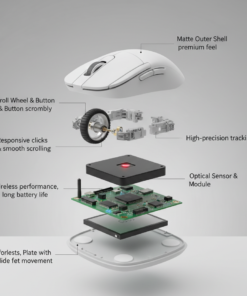
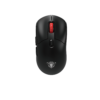
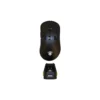
The Jedel GWH-102 is a high-performance “7D” gaming mouse that utilizes the professional-grade PAW3311 optical sensor. Its standout feature is the Tri-Mode connectivity, which allows you to switch between a 1000Hz Wired connection, 2.4GHz Wireless, and Bluetooth. To ensure you never run out of power during a match, it comes bundled with an RGB magnetic charging dock, allowing you to simply drop the mouse onto the base when not in use. The ergonomic, medium-profile shell is designed for stability and comfort during long-duration FPS or MOBA sessions.
Specifications
| Feature | Details |
| Model | GWH-102 |
| Connectivity | Tri-Mode: Bluetooth / 2.4GHz / USB-C Wired |
| Sensor | PixArt PAW3311 |
| DPI Resolution | 1200 – 2400 – 3200 – 4800 – 6400 – 12000 DPI |
| Polling Rate | Adjustable: 125 – 250 – 500 – 1000Hz |
| Switch Life | 20 Million Clicks (Left/Right Keys) |
| Battery | Built-in 500mAh Rechargeable Lithium |
| Battery Life | 60+ Hours (Wireless Mode) |
| Dimensions | 124 × 66 × 38 mm |
| Weight | Approx. 95g |
Key Features
-
Magnetic Charging Dock: Includes a dedicated desk dock with RGB lighting. This makes charging effortless and keeps your desk looking organized.
-
Pro-Grade PAW3311 Sensor: Offers a massive range up to 12,000 DPI, providing pixel-perfect tracking and high-speed flick accuracy.
-
True Tri-Mode Versatility: Bluetooth for office/laptop use, 2.4GHz for low-latency gaming, and Wired for simultaneous playing and charging.
-
1000Hz Return Rate: Ensures zero-lag communication between the mouse and your PC, a must-have for competitive gaming.
-
20 Million Click Durability: Equipped with reinforced switches that are built to handle years of intense gaming without developing “double-click” issues.
-
Parachute Braided Cable: The 1.5m included USB-C cable is designed to be ultra-flexible and drag-resistant for those who prefer wired mode.
JEDEL GWH-102 Tri-Mode Gaming Mouse Best Price in Bangladesh
JEDEL GWH-102 Tri-Mode Gaming Mouse Best Price in Bangladesh is 2,500 BDT.
FAQs
Q: How do I charge the mouse using the dock?
A: Simply align the magnetic contact points on the bottom of the mouse with the pins on the dock. The dock’s RGB lighting will usually change color or pulse to indicate that charging has begun.
Q: Can I customize the DPI levels?
A: Yes, the mouse has 6 preset DPI levels (up to 12,000). You can cycle through them using the top button, and the internal LED often changes color to show which level is active.
Q: What is the “Return Rate” and how do I change it?
A: The Return Rate (Polling Rate) is how often the mouse reports its position to the PC. You can typically toggle between 125Hz and 1000Hz using a combination of mouse buttons or dedicated switches on the bottom.
Q: Does it work with Mac?
A: Yes, it is fully plug-and-play for Windows and macOS. However, advanced button mapping for the 7D layout is most commonly optimized for Windows.
| Color | Black, White |
|---|
Brand
Jedel
Be the first to review “JEDEL GWH-102 Tri-Mode Gaming Mouse”
Related products
Reviews
There are no reviews yet.