


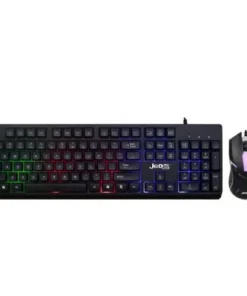
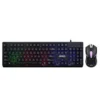
Jedel GK106 RGB Gaming Keyboard Mouse Combo
Buy the Jedel GK106 RGB Gaming Keyboard Mouse Combo in Bangladesh from T-TECH. A genuine keyboard with reliable performance and great value. Price in Bangladesh: 1,000. 100% authentic with warranty and cash on delivery nationwide.
 Call Now for Online Order
 Via Messenger
 Via WhatsApp
Warranty

Shipping


Payment Methods
Delivery Time
Inside Dhaka: Next day to 3 business days. *Inside Dhaka North and South City Corporation. Outside Dhaka: Next day to 5 business days.
Shipping Charge
Inside Dhaka: Starts from 70Tk. Outside Dhaka: Starts from 120Tk.
Payments
Spend TK.5000+ & pay in 3-36 months.
Jedel GK106 RGB Gaming Keyboard Mouse Combo
Description
The Jedel GK106 is a Wired Gaming Bundle that includes a full-sized 104-key keyboard and an ergonomic optical gaming mouse. It features a “Pro Gaming” aesthetic with enhanced RGB backlighting that is often more vibrant than entry-level models. Built with high-quality ABS and featuring a reinforced internal plate, it provides a stable, non-flexing platform for both intense gaming and heavy office typing.Order from T-Tech or visit our Shop- (New)06, 1st Floor, Shah Amanat City Corporation Super Market, Chittagong, Bangladesh.
Specifications
Keyboard
| Feature | Details |
| Type | High-performance Membrane (Mechanical feel) |
| Layout | 104 Keys (Full-Sized) |
| Interface | Wired USB 2.0 (Plug & Play) |
| Cable Length | 1.5 Meters |
| Dimensions | 446 x 151 x 30 mm |
| Durability | Rated for ~10 Million Keystrokes |
Mouse
| Feature | Details |
| Type | High-Precision Optical Mouse |
| DPI Settings | Standard 1000 DPI (Up to 1600 DPI on some variants) |
| Buttons | 4 Buttons (Left, Right, Scroll, DPI Switch) |
| Cable Length | 1.5 Meters |
| Switch Life | ~3 Million Clicks |
Key Features
-
Customizable RGB Backlighting: Features dynamic lighting modes that can be adjusted or toggled directly via the keyboard hardware.
-
Ergonomic & Anti-Slip: Engineered for long-session comfort with a slight wrist-rest area and rubberized feet to prevent sliding.
-
Water-Resistant Build: Designed with drainage gaps to protect against minor liquid spills.
-
19-Key Anti-Ghosting: Allows for complex simultaneous key presses (like $W+A+Shift+Space$) without input failure.
-
Multimedia Shortcuts: Integrated Fn keys provide quick access to volume, media player, email, and homepage.
Jedel GK106 RGB Gaming Keyboard Mouse Combo Best Price in Bangladesh
Jedel GK106 RGB Gaming Keyboard Mouse Combo Best Price in Bangladesh is 1,000 BDT.
FAQs
Q: Is the GK106 a true mechanical keyboard?
A: No, it is a membrane keyboard with “mechanical-feel” plungers. This gives you tactile feedback similar to a mechanical switch but with the quiet operation of a membrane.
Q: Can I change the mouse DPI?
A: Yes, the mouse features a dedicated DPI button below the scroll wheel, allowing you to toggle between sensitivity levels on the fly.
Q: How do I control the lighting effects?
A: Use the Fn + Scroll Lock or a dedicated “Light” key to cycle through effects. Fn + PgUp/PgDn typically controls the brightness level.
Q: Is it compatible with Mac and Linux?
A: Yes, it is fully plug-and-play across Windows, macOS, and Linux.
Frequently Asked Questions
What is the price of the Jedel GK106 RGB Gaming Keyboard Mouse Combo in Bangladesh?
The Jedel GK106 RGB Gaming Keyboard Mouse Combo is priced at BDT 1,000 at T-TECH Bangladesh, with EMI options available on eligible cards.
Is the Jedel GK106 RGB Gaming Keyboard Mouse Combo an authentic product?
All Jedel products sold at T-TECH Bangladesh are 100% genuine, sourced through official channels.
Does the Jedel GK106 RGB Gaming Keyboard Mouse Combo come with a warranty?
Yes, it comes with official warranty coverage handled directly through T-TECH's after-sales service.
Can I pay cash on delivery for the Jedel GK106 RGB Gaming Keyboard Mouse Combo?
Yes, cash on delivery is available nationwide, along with EMI payment options on eligible cards.
How long does delivery take for the Jedel GK106 RGB Gaming Keyboard Mouse Combo in Bangladesh?
Orders are typically processed within 1 business day and delivered within 1–5 business days across Bangladesh, with a 7-day return window.
Brand
Jedel
Be the first to review “Jedel GK106 RGB Gaming Keyboard Mouse Combo”
Related products
Reviews
There are no reviews yet.