

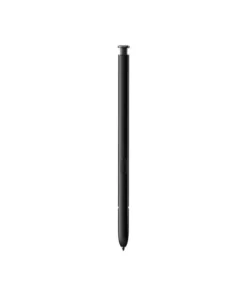
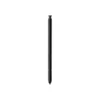
Samsung Galaxy S22 Ultra S Pen Stylus
Buy the Samsung Galaxy S22 Ultra S Pen Stylus in Bangladesh from T-TECH. A genuine stylus pen with reliable performance and great value. Price in Bangladesh: 4,500. 100% authentic with warranty and cash on delivery nationwide.
Original price was: ৳ 5,000.00.৳ 4,500.00Current price is: ৳ 4,500.00.
 Call Now for Online Order
 Via Messenger
 Via WhatsApp
Warranty

Shipping


Payment Methods
Delivery Time
Inside Dhaka: Next day to 3 business days. *Inside Dhaka North and South City Corporation. Outside Dhaka: Next day to 5 business days.
Shipping Charge
Inside Dhaka: Starts from 70Tk. Outside Dhaka: Starts from 120Tk.
Payments
Spend TK.5000+ & pay in 3-36 months.
Samsung Galaxy S22 Ultra S Pen Stylus
Description
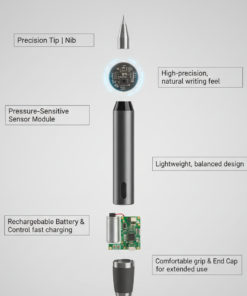
The S22 Ultra S Pen is more than just a stylus; it is a Bluetooth-enabled productivity tool. It features a matte-finish body for a comfortable, non-slip grip and is housed directly within the bottom-left slot of the phone. Samsung drastically improved the handwriting experience for this model, using AI prediction to make the digital ink feel like it’s flowing directly from the 0.7mm tip onto the glass without any delay.Order from T-Tech or visit our Shop- (New)06, 1st Floor, Shah Amanat City Corporation Super Market, Chittagong, Bangladesh.
Specifications
| Feature | Details |
| Latency | 2.8 milliseconds (Super-fast response) |
| Pen Tip | 0.7 mm (Fine-point precision) |
| Pressure Levels | 4,096 levels (Sensitive to light or heavy strokes) |
| Connectivity | Bluetooth Low Energy (BLE) |
| Battery Life | ~20 mins continuous Air Actions; ~24 hours standby |
| Charging | Automatic (Full charge in ~7 minutes inside the phone) |
| Water Resistance | IP68 Rating (Waterproof up to 1.5m for 30 mins) |
| Weight | ~3 grams |
Key Features
-
Air Actions: Use the S Pen as a remote control. You can take photos, flip through gallery slides, or control music volume with simple gestures in the air.
-
Screen Off Memo: Simply pop the S Pen out while the screen is off to start writing notes instantly without unlocking the phone.
-
Text Export: Using advanced OCR (Optical Character Recognition), the S22 Ultra can instantly convert your handwritten scribbles into digital text for emails or documents.
-
Air Command: Hovering the pen and clicking the button opens a customizable menu of shortcuts like Smart Select (for GIFs), Screen Write, and Translate.
-
Precision Sketching: With 4,096 levels of pressure sensitivity, it is a professional-grade tool for digital artists and designers.
Samsung Galaxy S22 Ultra S Pen Stylus Best Price in Bangladesh
Samsung Galaxy S22 Ultra S Pen Stylus Best Price in Bangladesh is 4,500 BDT.
FAQs
1. Is the S Pen itself waterproof? Yes. Both the S Pen and the Galaxy S22 Ultra are IP68 rated. You can write on the screen even if it is wet, though it is recommended to dry the pen before sliding it back into the charging slot.
2. Does it work on other Samsung devices? The S22 Ultra S Pen can be used for writing on any Samsung device that supports S Pens (like the S21 Ultra or Tab S series). However, the Air Actions (remote control features) usually only work when the pen is paired with its specific model.
3. What happens if I lose my S Pen? The phone has a “Pen Proximity Alert.” If you walk away with the phone while the S Pen is left on a table, the device will send a notification and sound an alarm to prevent you from losing it.
4. Does the S Pen need to be charged to write? No. The “passive” writing and sketching features work even if the S Pen battery is at 0%. You only need a charge for the Bluetooth Air Actions (remote shutter, gesture control).
5. How do I reset my S Pen if it stops connecting? Insert the S Pen into your phone, go to Settings > Advanced Features > S Pen, tap the three dots in the corner, and select “Reset S Pen.”
Frequently Asked Questions
What is the price of the Samsung Galaxy S22 Ultra S Pen Stylus in Bangladesh?
The Samsung Galaxy S22 Ultra S Pen Stylus is priced at BDT 4,500 at T-TECH Bangladesh, with EMI options available on eligible cards.
Is the Samsung Galaxy S22 Ultra S Pen Stylus an authentic product?
All SAMSUNG products sold at T-TECH Bangladesh are 100% genuine, sourced through official channels.
Does the Samsung Galaxy S22 Ultra S Pen Stylus come with a warranty?
Yes, it comes with official warranty coverage handled directly through T-TECH's after-sales service.
Can I pay cash on delivery for the Samsung Galaxy S22 Ultra S Pen Stylus?
Yes, cash on delivery is available nationwide, along with EMI payment options on eligible cards.
How long does delivery take for the Samsung Galaxy S22 Ultra S Pen Stylus in Bangladesh?
Orders are typically processed within 1 business day and delivered within 1–5 business days across Bangladesh, with a 7-day return window.
Brand
SAMSUNG
Be the first to review “Samsung Galaxy S22 Ultra S Pen Stylus”
Related products

Reviews
There are no reviews yet.